Register at Buffalo Spins Casino and Start Playing in Minutes

Creating an account at Buffalo Spins takes a few minutes. Once registered, you get access to 1,000+ slot games, bingo rooms, live casino, jackpot titles, welcome free spins on Big Bass Splash, and personal tools like Daily Wheel and Missions. This guide covers every step - from filling in your details to verifying your identity and claiming your first bonus.

50 Free Spins on Big Bass Splash — deposit £10
Create Accountwith bonus

What You Need Before Signing Up

Buffalo Spins Casino is licensed by the UK Gambling Commission (licence 039175-R-319452-022) and is open to UK residents only. Before you start, make sure you meet the basic eligibility criteria:

  • You must be 18 or older - accounts opened by minors are closed immediately and any funds are returned
  • You must be a UK resident and not located in a restricted country (including the US, Russia, France, Italy and others listed in the terms)
  • You will need a valid UK mobile number and email address
  • Your name and date of birth must match your official ID documents

Only one account per person is permitted across the entire Jumpman Gaming network. If you already hold an account on any Jumpman brand - such as Amazon Slots, Fever Slots or Win Windsor - you cannot register again.

Where to Find the Registration Button

On the desktop version of buffalospins.com, the 'Join Now' or 'Register' button is in the top-right corner of the header. On mobile, the same button appears prominently in the navigation bar. Clicking it opens a three-step registration form directly in the browser - no download or app installation is needed to sign up.

Open Registration Form

Step-by-Step Registration Process

Buffalo Spins uses a three-screen registration flow. Each screen collects a specific category of information. Here is exactly what to expect.

Registration Steps

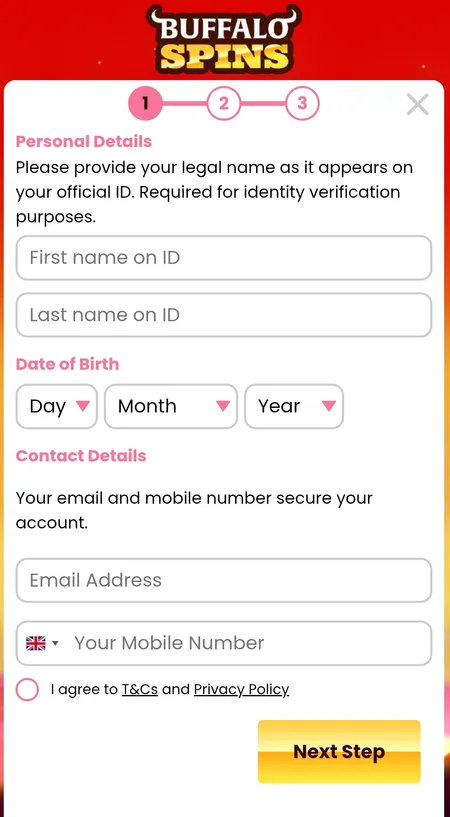
  1. Step 1 personal details form

    Step 1 - Personal Details: Enter your legal first and last name exactly as they appear on your passport or driving licence. Add your date of birth, a valid UK email address and your UK mobile number. These details are used for identity verification and cannot be changed freely later.

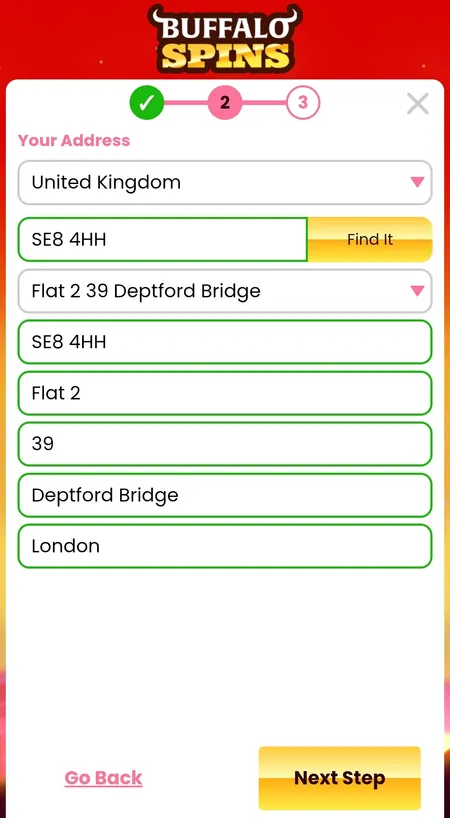
  2. Step 2 address and postcode lookup

    Step 2 - Address: Select your country (UK) and enter your postcode to use the automatic address lookup, or fill in your address manually. Your residential address must match the address on your proof-of-address document - typically a utility bill or bank statement dated within the last three months.

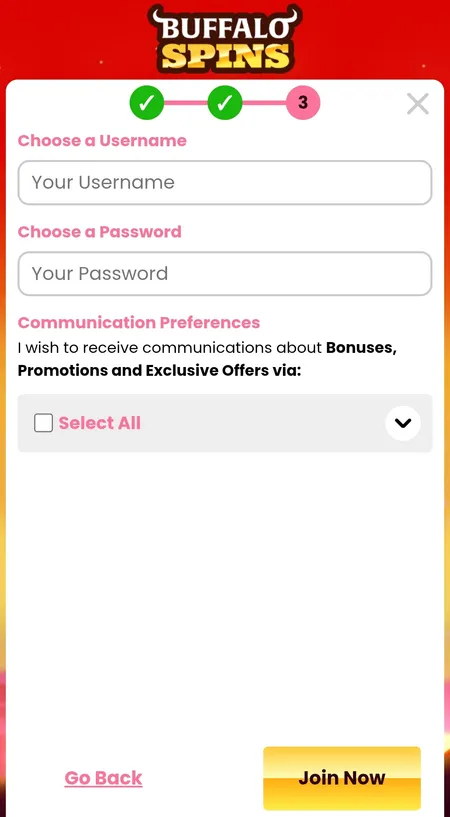
  3. Step 3 username password and marketing consent

    Step 3 - Username, Password and Consent: Choose a unique username - this is what you will use to log in. Set a strong password. Review the marketing preferences (email, SMS, phone) and tick or untick as you prefer. Click 'Join Now' to submit your registration.

✓

Winning free spins from the welcome offer are paid out as real cash with 0x wagering requirement. You only need to meet a 10x wagering requirement on any bonus funds credited separately - not on free spin winnings.

Registering a Debit Card for Extra Spins

Once your account is created, you can add a debit card in the My Account section. Buffalo Spins accepts Visa, Mastercard and Maestro debit cards. The card must be issued in your name - the same name used during registration. Adding a valid debit card to your account automatically triggers a reward of 10 additional free spins. Up to three debit cards can be stored on a single account.

This is separate from the main welcome bonus. You do not need to make a deposit just to register a card.

Add Your Card and Get 10 Spins

Welcome Bonus After Registration

New players who deposit a minimum of £10 receive 50 free spins on Big Bass Splash. The wagering requirement on free spin winnings is 0x - those wins go straight to your real cash balance. If any bonus funds are credited alongside the free spins, a 10x wagering requirement applies to those bonus funds only.

Bonus Detail Value
Minimum deposit to qualify £10
Free spins awarded 50 on Big Bass Splash
Wagering on free spin wins 0x (real cash)
Wagering on bonus funds 10x
Maximum bonus conversion Up to £250 (lifetime deposits)

No promo code is required. The offer activates automatically when you make your first qualifying deposit. For a full breakdown of all current promotions, visit the Buffalo Spins bonuses page.

KYC Verification - What to Prepare

Buffalo Spins is required by UKGC regulations to verify player identity before processing withdrawals. The verification status and required documents are visible in My Account under Account Details. Standard KYC documents include:

  • Proof of ID: Passport or driving licence (photo required)
  • Proof of address: Utility bill or bank statement dated within the last 3 months
  • Proof of payment method: A photo of your debit card (first 6 and last 4 digits visible, middle 6 covered)

Uploading documents early avoids delays when you first request a withdrawal. All financial data is protected by 256-bit SSL encryption, the same standard used in online banking.

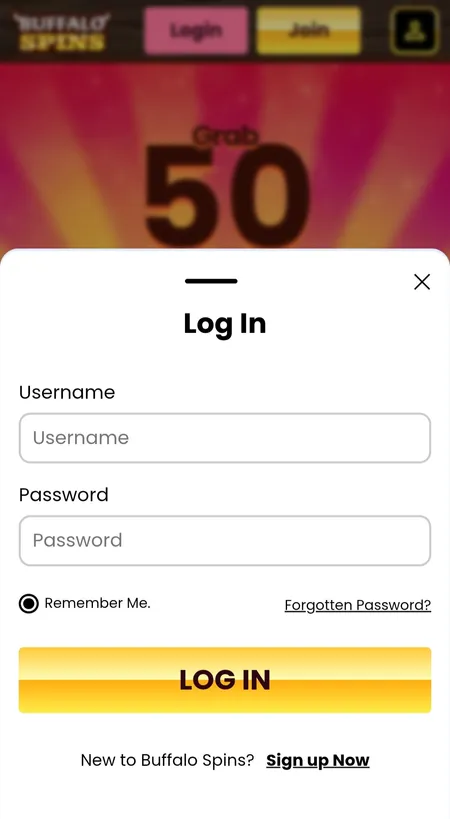
Buffalo Spins login screen after registration

After registration you log in using your chosen username and password. The 'Remember me' option is available for trusted devices.

Account Security After Registration

Buffalo Spins recommends enabling two-factor authentication (2FA) immediately after creating your account. You should also save your recovery codes in a secure location. The platform uses bank-grade 256-bit SSL encryption across all financial transactions.

Additional security features available in your account settings:

  • Deposit limits - set daily, weekly or monthly caps on how much you can deposit
  • Reality Check - receive a notification after a set period of play reminding you to review your session
  • Time-out - pause your account for 24 hours up to 6 weeks
  • Self-exclusion - Buffalo Spins participates in GamStop, the national self-exclusion scheme; activating GamStop blocks access across all UK-licensed sites

All responsible gambling tools activate immediately - no need to contact support. If you set a limit or exclusion on one Jumpman site, it applies automatically across the whole network.

✕

Buffalo Spins does not accept credit card payments in line with UK Gambling Commission rules. Only debit cards (Visa, Mastercard, Maestro), PayPal, Paysafecard and Pay by Mobile are accepted for deposits.

Visit Buffalo Spins Casino

Registration on Mobile and Different Devices

The Buffalo Spins website is fully responsive and works on all screen sizes without requiring a separate app download. The registration form behaves identically on desktop, mobile browser and tablet. For iOS users, the Buffalo Spins app (App Store ID: 6443596229) also supports account creation directly within the app.

Android users can access the full registration flow through any modern mobile browser. The process is identical to desktop - three steps, same fields, same validation.

If you encounter issues during registration on mobile (form not submitting, postcode lookup not working), try switching from Wi-Fi to mobile data or clearing your browser cache.

Common Registration Issues

Problem Solution
Email already in use You may already have a Jumpman account on another brand
Mobile number not accepted Must be a valid UK number starting with 07 or +44
Postcode not found Use the manual address entry option
'Join Now' button inactive All required fields must be completed first
Not receiving a verification email Check spam/junk folder; allow up to 5 minutes

If you are still unable to register, contact the support team at [email protected]. Responses are aimed within 2 working days.

For a full overview of what awaits you on the platform after signing up, explore the Buffalo Spins home page where you will find the game categories, active promotions and navigation structure explained.

FAQ: Registration at Buffalo Spins

How long does registration take?

The three-step form typically takes 2 to 5 minutes to complete. Identity verification (KYC) is a separate process that may be requested before your first withdrawal.

Can I register if I am not from the UK?

Buffalo Spins is primarily a UK-facing casino. Players from restricted countries including the US, Russia, France, Italy and others cannot register. For non-UK markets, Alderney Gambling Control Commission regulation applies where available.

Do I need a promo code to get the welcome bonus?

No promo code is needed. The 50 free spins on Big Bass Splash are credited automatically when you deposit £10 or more after registering.

What documents do I need for KYC?

You need a government-issued photo ID (passport or driving licence), a proof of address (utility bill or bank statement dated within 3 months), and proof of your payment method.

Can I register on the mobile app?

Yes. The iOS app (App Store ID: 6443596229) supports registration. Android users can register through the mobile browser - the experience is identical.

What if my email address is already in use?

This usually means an account already exists in the Jumpman Gaming network using that email. Try the password reset option or contact support at [email protected].

Is my personal data safe?

Yes. Buffalo Spins uses 256-bit SSL encryption on all transactions and personal data, the same standard applied by UK banks. The site also holds a GoDaddy SSL certificate.

How many accounts can I have?

Only one account per person is allowed across the entire Jumpman Gaming network of 100+ casino brands. Creating duplicate accounts may result in all accounts being closed.

What happens if I am under 18?

Any account found to belong to a person under 18 is closed immediately. All deposits made are returned in full. Age verification checks are conducted during and after registration.

How do I reset my password if I forget it?

Use the password reset option on the login screen. Enter your username or registered email address and follow the instructions sent to your inbox.

Ready to play? Registration at Buffalo Spins takes under 5 minutes. Deposit £10 and get 50 free spins on Big Bass Splash with winnings paid as real cash.