Buffalo Spins Account Login — Fast, Secure Access to Your Casino Dashboard

Logging in to Buffalo Spins Casino gives you full access to your game history, active bonuses, payment methods, responsible gambling tools and personalised settings. The login process takes under 30 seconds on both desktop and mobile. This guide covers every step - from finding the sign-in button to recovering a forgotten password and enabling two-factor authentication for extra protection.

50 Free Spins on Big Bass Splash — deposit £10
Create Accountwith bonus

Where to Find the Login Button

On the Buffalo Spins website, the LOG IN button sits in the top-right corner of the header on every page. On mobile browsers the same button appears in the same position - tap it and the login modal opens instantly. There is no separate login page; the form loads as an overlay so you stay on whichever page you were browsing.

If you use the iOS app (App Store ID 6443596229), the sign-in screen appears immediately after launching the app if no session is saved.

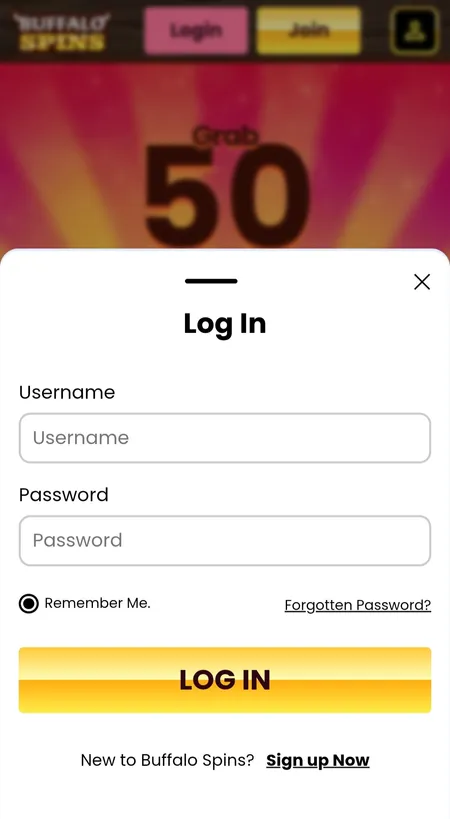
Buffalo Spins login modal with username and password fields

The login modal shows username, password, a 'Remember me' checkbox and the LOG IN button. The forgot-password link is directly below the password field.

Step-by-Step: How to Log In

Follow these steps on desktop or mobile browser:

  1. Click LOG IN in the top-right header.
  2. Enter your username in the first field.
  3. Enter your password in the second field.
  4. Tick Remember me if you want the browser to store your session.
  5. Click LOG IN to submit.

If the credentials are correct, the modal closes and your account dashboard loads. If you see an error, check caps lock, clear the field and try again. Three failed attempts in a row may trigger a temporary lock - wait a few minutes before retrying.

Sign In to Buffalo Spins

Logging In on Mobile and the iOS App

Buffalo Spins is fully optimised for mobile browsers on iOS and Android - no separate APK is needed. The login modal on mobile is identical to desktop, but touch-optimised: fields are large enough to tap without zooming, and the keyboard appears automatically.

The iOS app (available on the App Store) saves your session between launches. After the first login, you only need to re-enter credentials if you manually log out, clear app data or if the session expires after a long period of inactivity.

On Android, use the mobile browser version. The experience is smooth and loads quickly on any modern browser including Chrome and Safari.

How to Reset Your Password

If you have forgotten your password, use the Forgot Password link directly below the password field in the login modal.

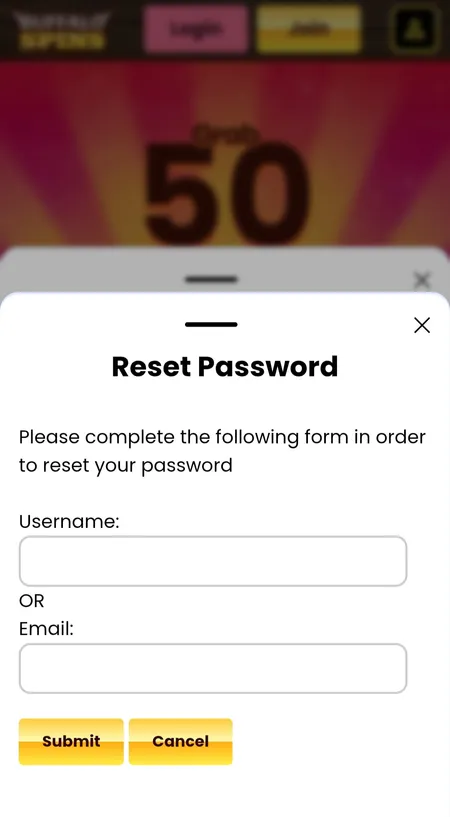
Buffalo Spins password reset modal with username and email fields

Enter your username or registered email address, then click Submit. A reset link will be sent to your inbox within a few minutes.

The reset process:

  1. Click Forgot Password in the login modal.
  2. Enter your username or registered email address.
  3. Click Submit.
  4. Check your inbox for a reset email (also check spam/junk).
  5. Click the link in the email and follow the instructions to set a new password.

Your new password must be unique and not reused from other sites. Buffalo Spins does not reveal minimum character requirements publicly, but standard practice is at least 8 characters mixing letters and numbers.

Visit Buffalo Spins Casino

Session Management and Auto-Login

Setting Behaviour
Remember me ticked Session persists across browser restarts
Remember me unticked Session ends when browser tab closes
iOS app Session saved until manual logout or app data clear
Public/shared device Always untick Remember me and log out manually

Clearing browser cookies or cache will end any saved session even if Remember me was selected. After that, a fresh login with full credentials is required.

Two-Factor Authentication (2FA)

Buffalo Spins recommends enabling 2FA for all accounts. When active, after entering your username and password you receive a one-time code via email or SMS. You must enter this code to complete the login.

To enable 2FA:

  • Go to My Account after logging in.
  • Navigate to Account Details or Security Settings.
  • Follow the on-screen instructions to link your phone number or email for code delivery.

If a 2FA code does not arrive, check your spam folder, confirm the registered phone number is correct, and wait up to 2 minutes before requesting a new code. Buffalo Spins uses 256-bit SSL encryption across all sessions, so the code transmission is fully protected.

Buffalo Spins uses 256-bit SSL encryption for all login sessions and financial transactions - the same standard used in UK retail banking.

Login Problems: Quick Fixes

Problem Fix
Wrong password error Reset via Forgot Password link
Account temporarily locked Wait 5-10 minutes, then retry
Page not loading Clear browser cache or try a different browser
2FA code not arriving Check spam, confirm phone number in account settings
App not accepting login Update the iOS app to the latest version

For persistent issues, contact the support team at [email protected]. The team aims to respond within 2 business days. There is no live chat available.

Open Buffalo Spins Account

What You Can Access After Login

Once signed in, your account gives you access to:

  • Game lobby - all 1,000+ titles across Slots, Live Casino, Jackpots, Bingo and Casino sections.
  • Bonuses and Promotions - active offers, Daily Wheel spins, and Missions.
  • Payment section - deposit, withdraw and view transaction history.
  • Responsible Gambling tools - deposit limits, loss limits, Reality Check, time-out and self-exclusion.
  • Inbox - personalised messages, bonus notifications and updates.
  • Account Details - KYC verification status, registered payment cards and personal data.

The Buffalo Spins home page shows your current balance, active bonus balance and mission progress immediately after login.

KYC Verification and Payments After Login

Before your first withdrawal, Buffalo Spins requires identity verification (KYC). In My Account > Account Details > Verification Status you can see which documents are outstanding. Standard documents required:

  • Photo ID (passport or driving licence)
  • Proof of address (utility bill or bank statement)
  • Proof of payment method (card or PayPal confirmation)

Withdrawals are processed within a 72-hour pending window, then arrive in 1-3 business days. A flat fee of £2.50 applies per withdrawal. Minimum withdrawal is £10. For amounts under £10, contact support directly.

You can also learn about payment options in detail on the Buffalo Spins payments page.

Kредитные карты не принимаются для депозита или вывода средств - Buffalo Spins работает исключительно с дебетовыми картами, PayPal и Paysafecard в соответствии с требованиями UK Gambling Commission.

Security Best Practices for Your Account

  • Use a password unique to Buffalo Spins - never reuse passwords from email or other sites.
  • Enable 2FA in account settings to add a second verification layer.
  • Avoid logging in on public Wi-Fi networks without a VPN.
  • Always use the Log Out button when finished, especially on shared devices.
  • Save your recovery codes in a secure location separate from your login credentials.

Activating self-exclusion or a time-out on any Jumpman Gaming site - including Buffalo Spins - applies automatically across the entire Jumpman network of 100+ casinos.

Logging Out

To log out, click your account icon or username in the top-right corner and select Log Out. This ends your current session immediately. If you believe your account has been accessed without permission, contact [email protected] straight away and change your password.

Login FAQ

I forgot my username - what should I do?

Check the welcome email you received when you registered - your username is included there. If you cannot find it, email [email protected] with your registered email address and they will help you retrieve it.

Why is my password being rejected even though it looks correct?

Check that caps lock is off and there are no extra spaces copied into the field. If the issue continues, use the Forgot Password link to reset it.

How long does a password reset link stay valid?

Buffalo Spins does not publish the exact expiry time, but standard practice is 24 hours. If the link has expired, request a new one through the Forgot Password form.

Can I stay logged in on two devices at the same time?

Yes, Buffalo Spins does not restrict simultaneous sessions on multiple devices. However, logging out manually on each device is recommended for security.

Does the Daily Wheel reset require a fresh login?

No - the Daily Wheel resets at midnight UK time. As long as your session is active, you can spin without logging out and back in.

What happens if I get locked out after multiple wrong attempts?

A temporary lock is applied automatically. Wait 5-10 minutes and try again. If you are still locked out, use Forgot Password or contact support.

Is login available 24/7?

Yes, the Buffalo Spins platform is available around the clock. Support responses, however, target a 2-business-day turnaround.

Will GamStop affect my ability to log in?

Yes. If you have registered with GamStop and activated a self-exclusion, you will be unable to log in or create a new account on Buffalo Spins or any other Jumpman Gaming site.

Ready to access your Buffalo Spins account? Use the steps above to sign in securely and explore over 1,000 games, live casino tables and exclusive bingo rooms.